








Geek Stuff category archive
UPSed 5
I stopped at Staples in north Dover to get printer cartridges and picked this up:

Leaving Staples, I had an uprecedented experience. I made it all the way through town without a single red light. And this in a town that doesn’t believe in syncing stoplights.
Now to unravel my database. Which will probably have to wait until the weekend.

I Hate Computers 0
As you can see from this line at the top of the page:
WordPress database error: [Can’t find file: ‘wp_secureimage.MYI’ (errno: 2)]
DELETE from wp_secureimage WHERE img_datetime < '[time]'
All is not well in SQL Land. There was a momentary–less than a second–power failure this afternoon, and it singed my database. I was telling myself it was time to back it up, but work came first.
But things are better than they were an hour ago, when Apache would not run. Rotating the log files cleared that up.
Now I get to mess with SQL to take care of that error message, but I’m up and running, even if the tires are leaky and I have rags tied around them, like in an old cartoon.
I’m definitely getting that UPS this week.
And I get to learn more about SQL when I get a chance to get away from cooling towers.
A HOSTS File Is a Wonderful Thing 5
It leaves big holes in my browser where the ads should be by redirecting advertisers like DoubleClick to look for their ads on my own harddrive, where, of course, they ain’t.
I use this one, which I learned about here. (Karen, this site is an excellent site for help with Windows in plain English.)
The same HOSTS file works on both Windows and Linux.
In Windows XP, it goes into C:\Windows\System32\Drivers\Etc. The link explains where it goes in other flavors of Windows.
In Slackware Linux, it goes in the root of /etc. Linux users, be careful to copy the contents of your default host file identifying your computer name as 127.0.0.1 into the HOSTS file (it should already have line identifying “localhost” as 127.0.0.1). For other flavors of Linux, consult your local distro.
Be a good host. Get a HOSTS file and make those ads go away.
Phillybits RSS MIA 7
If you look at my sidebar, over there ——–>
you’ll notice Phillybits’s RSS updates are gone.
They stopped working, for some reason. They are working on my other computers, just not on the server. So I’m giving him a rest until I figure it out. In the meantime, the link in the blogroll still works.
New Horizons 2
Ziff Davis editor Steven J. Vaughan-Nichols suggests four reasons that Windows Vista is superior to Linux.
I’ll share number two. Follow the link the see the rest:

I Was Down, Now I’m Up 0
And it had nothing to do with modern pharmaceuticals.
I’ve been a bad little webmaster. I’ve neglected my Apache log files. Then they got too big, and gave me the finger.
I emptied them, and now I’m running again.
That doesn’t have anything to do with the speed of my internet connection, which seems to have slowed to beyond a crawl. Indeed, it was taking so long to download the TV listings that we ended up going to channel 99 and watching them scroll by on the box.
My ISP is crawling for some reason–I hope it’s back to a normal speed tomorrow. And not just on this computer.
Oh, yeah, and didn’t the Bears put the hurt on N’awlins today.
Adventures in Linux: Tipping CUPS (Geek Alert) 0
A little while ago, I wrote of my adventures getting Samba working across my network and mentioned that my next project was networking my webserver to the printer on my other Linux computer.
I use CUPS for Linux printing. It worked first-time, all the time on the local printer. But I just couldn’t seem to get CUPS on the webserver to connect with CUPS here.
I solved it today.
I had to correct edit my firewall configuration file (/etc/rc.d/rc.firewall), setting the proper condition to permit a connection. That took asking for help from the Slackware mailing list, since the firewall website seemed to have disappeared. One of the netizens there pointed me to the new website:
PERMIT=”[my subnet]/24″
Then I actually had an idea of my own, and looked inside the CUPS configuration file (/etc/cups/cupsd.conf) and found the following settings to allow or prevent external connections. By default, it was set to DENY ALL from the Big Wide World. I changed it as follows to allow my network in the door:
Encryption IfRequested
Satisfy All
Order deny,allow
Deny From All
Allow From [my subnet]
AuthType Basic
AuthClass System
Encryption IfRequested
Satisfy All
Order deny,allow
Deny From All
Allow From [my subnet]
Now I’m happily printing across the Linux portion of the network.
Rotten Apples in the Windows 10
Now that my youngest has left home, equipped with his own computer, I’ve been slowly removing some of his apps from the “family” (that is, the one he plays games on when he visits) computer.
On of the apps was iTunes (don’t know why, he doesn’t have an iPod).
Today, I was using the Registry Fixer from my Favorite Windows Utility Suite.
It was unable to remove iTunes keys from the registry.
I opened up regedit and found that those keys were installed with NO PERMISSIONS ALLOWED. Not even the Administrator had rights to the keys. I had to manually (well, as manual as anything including a keyboard can be) change the permissions. And, on two of them, I was unable to change the permissions at all.

Those keys are still there cluttering up my computer.
This is not right.
More Decorating (Geek Alert) 1
I spent a good part of today decorating my computers for Christmas, with the help of the Keramic Christmas color scheme, KDE Christmas wallpapers and Splash Screens (there was this one, also), and Judy and Jerry’s Place for Winamp (Windows) and XMMS (Linux) skins.
With two Linux computers and one Windows computer, it kept me off the street for a couple of hours.
The only problem I ran into was finding a Christmas/Winter screensaver for Linux/KDE–any suggestions are welcome. Here’s the computer I’m working playing at right now:

Adventures in Linux: Tangoing with Samba 3
One of the things I’ve been doing during my hiatus (see the immediately preceding post) is working on my network. I have two Linux boxes and a Windows box and a big ole 50 GB partion on the webserver that was intended to be a file server for the other computers.
Unfortunately, I couldn’t get the partition to mount. Opie will understand: it was a spelling error in /etc/fstab. (I left the “s” off of “defaults.”)
(Funny. Our teachers used to tell us that spelling was important. Computers have made it sew.)
Now it mounts .
On to Samba.
I have poked in a deletorious fashion at getting Samba to run over the past 18 months, when I got my first Linux box. Now I have it working.
The webserver can see the Windows box and the Windows box can see the webserver and I can move files back and forth with no problems. My laptop can see both of them. The only wrinkle left is that no one else can see the laptop (I think that’s a firewall issue, but I’m going to let it drop for a while).
Next step–Networking the webserver to a printer connected to a whole nother computer.
Computers 0
From the Quotes of the Day (a litle while ago–I’m catching up):
For a long time it puzzled me how something so expensive, so
leading edge, could be so useless, and then it occurred to me
that a computer is a stupid machine with the ability to do
incredibly smart things, while computer programmers are smart
people with the ability to do incredibly stupid things. They
are, in short, a perfect match.
– Bill Bryson, Notes from a Big CountryThe question of whether a computer can think is no more
interesting than the question of whether a submarine can swim.
– Edsger DijkstraI have a theory about the human mind. A brain is a lot like a
computer. It will only take so many facts, and then it will
go into overload and blow up.
– Erma Louise Bombeck, 1927 – 1996Computers are like Old Testament gods; lots of rules and no mercy.
– Joseph CampbellA computer lets you make more mistakes faster than any
invention in human history – with the possible exceptions of
handguns and tequila.
– Mitch RatliffeThe computer is a moron.
– Peter F. Drucker
A Slight Detour: News You Can Use 0
From the Washington Post’s “The Checkout” consumer blog:
I followed the expert’s advice and more often the not, after I cleaned my cookies, I got the initial lower fare offer. The airlines denied they were tracking my cookies when I asked them about this. They all said the fluctuating prices simply reflected the number of seats available on a flight at the particular time I was trying to buy a ticket.
Relax, Trekkies. No Need To Get a Life. Yet 0
What goes around:

From El Reg:
Fans of the dead horse have had little to cheer about since Paramount gave up flogging it by canning Star Trek: Enterprise – the one with the fella off Quantum Leap – last year.
Interest in Star Trek has waned, a fact not lost on Shatner. He told Reuters: “The interest in Star Trek has waned.”
That Looks like My Box (Well, Except for the Charcoal) 3
Whoosh!
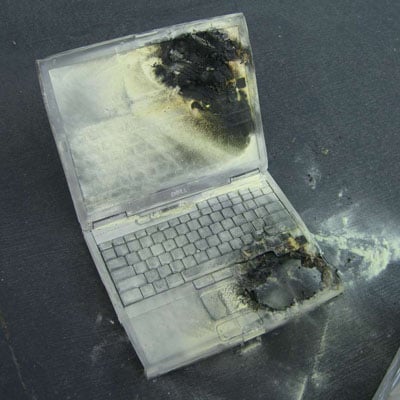
All seriousness aside, I’m thinking it’s possible they disregarded or did not receive a warning from Dell. Early on after I purchased the box I’m using right now, I got an email from Dell stating that there were problems with certain batteries from a particular vendor. Being rather paranoid about computers blowing up, I checked my battery and found it did not bear the suspect model numbers.
Might still take it out when I’m on AC, though . . . .
So What Is Linux, Chopped Liver? 0
The call came as part of a report detailing the main trends in malicious software so far this year. The main finding was that all of the top ten threats to online users targeted the Windows environment.
Sony Rootkit Settlement 0
I first mentioned Sony’s nefarious little rootkit in November.
Now the case has reached a settlement (from El Reg):
Consumers will receive new malware and vulnerability-free CDs, a patch to remove the offending XCP or MediaMax code, and Sony will be dishing out free downloads.
By the way, if you or anyone you know had trouble with this software, follow the link to the story; it contains links about how to file a claim.
Adventures in Linux, Wireless Department 0
I travel. Since I am a trainer, it’s often more cost-effective to bring one trainer to many trainees than vice versa.
From time to time, I’m trapped in a hotel that does not have proper internet service. Instead, they have (gasp) wireless.
Because they are too cheap to pay someone to pull cat 5 through their building.
So I decided I’d better figure out wireless for my laptop, which, natch, is a Linux box. (Have I mentioned what a relief it is not to have to constantly scan the box for adware and spyware?–most of that stuff doesn’t speak Linux. I scan once a week for viruses, but that’s about it.)
So I went out and got a D-Link access point to add to my network here at Pine View Farm Central and a Linksys PCMCIA card for the trusty laptop. (By the way, PCMCIA stands for “people can’t remember computer industry acronyms.”)
Then I went to Linuxant and grabbed the WLAN driver to help me use the Windows PCMCIA driver in my Linux laptop.
Worked like a charm.
Then I turned the encryption on in the access point.
No more charms. Can’t get an IP address.
(By the way, anyone setting up a wireless network really ought to turn on encryption–otherwise you are running naked through the network, and folks can park their cars in the street in front of your house and use your network).
So, I still need to figure out how to pass the encryption password to the PCMCIA card in Linux, but, fortunately for my main goal, most hotels do NOT encrypt their networks. They may password-protect their connections, requiring you to accept the “terms of service” before they allow you to connect, but they don’t keep you from getting an IP address, so I’m good to go for my next foray as a road warrior.
Which is coming up far too quickly.
Linuxant rocks.
Is Your Computer a Bot? 3
Kelly Martin has a fascinating article on “botnets” in Security focus:
If you don’t care about securing your computer, you ought to. Or you are part of the problem.
And once you do, you should read this article. It contains a lot of information in a small space.
With a tip of the hat to El Reg.
Microsoft Outlook 0
MS Outlook is the chosen email application for my new employer.
I have always avoided MS Lookout and Lookout Depress. I sort of have this thing about inviting viruses and trojans into my house.
I don’t do it. I like to practice safe hex.
When I AOL’d, I used the AOL offline email feature and it worked just fine. Then for a while, I used AOL’s IMAP client, AOL Communicator. It didn’t work too well with AOL 9, so I switched to Eudora, which works just fine with POP3 and IMAP mail systems. I liked it so much I bought a subscription. I tried Pegasus, which I really liked, but getting it to work with AOL IMAP was too much of a challenge for me.
Then I centralized all my personal email in Opera and haven’t looked back, even as I moved from Windows to Linux, even though KMail and Pine are wonderful programs.

At work, before the change, we used Lotus Bloats Notes; we used server-side, so it was slow, but the IS Manager at my previous employer wouldn’t let Outlook or MS Exchange on his servers on a bet. He also sort of has this thing about viruses and trojans too.
The reason my new employer is using Lookout is that a good portion of the staff–persons working out of home offices–already were using it. I think that’s a good business reason for choosing it, and I also think that using a standardized email client makes sense for a business.
But jeez oh man what a crappy program. It even looks and feels tinny.
And this morning it just stopped receiving mail. Nothing changed between when I logged off last night and when I logged on this morning. It just decided not to work. A reboot brought it back to life, but, honestly, real computer programs don’t act like that.
MS Outlook. Email for Lamer$ A less than desirable option.
Playing Computer 3
The lease is up on the computers I use in my training classes and that my employer uses in trade shows. Eight new laptops arrived, so one of my colleagues and I had fun today getting them ready.
They did not come with Windows software installation CDs. Dell may be the last company that actually provides installation, as opposed to “recovery” CDs.
These did not even come with “recovery” CDs. They came with the capability of burning “recovery” CDs. We did that once. Six CDs..
But we don’t need recovery. We need disk images. One each for the different training classes we conduct. So this is how we prepared them:
Create a new D:\ partition with Partition Magic.
Configure the C:\ drive as desired:
-
Set the Windows Explorer options to show hidden files, not hide file extensions, show the full path in the address bar.
-
Remove a bunch of stupid stuff from the menu (such as MSN Messenger).
-
Install Adobe Acrobat Reader.
-
Install two printer drivers.
-
Mute the speakers.
-
Set up logon passwords.
Create an image of that configurati:on, saving it to the D:\ drive.
So, now, whenever we need to start the computers from scratch for a new class or a new sho, we simply restore the image from D:\, overwriting C:\, and we are ready to start again.
Boy, I love messing with computers.